
SaaS & IT Content Marketing
Is Your English Website Machine-Translated?
You have read your own English website and it seems fine. Maybe a little stiff. A German colleague says it is accurate. But you can’t shake the feeling that an international buyer would read it differently. Does your English website read as translated, and how would you even know?
For a SaaS buyer, your English website is part of the product experience. If the homepage feels improvised, the buyer may wonder what else is improvised.
This article gives you a 15-minute check for spotting a machine-translated website, with ten tests, a simple scorecard and a priority order for fixing what you find. It is written for small SaaS and IT companies in Germany, Austria and Switzerland that publish in English without an English-speaking marketing team.
We write and edit in native English and read the German source, so we can see where an English sentence has carried the structure of its German original. The checks below focus on where that shows up in B2B SaaS.
If you want the business case first, read what an auto-translated English website costs a SaaS company. For the broader question of how German-speaking SaaS companies build international visibility, see our guide to SaaS content marketing services in Germany.
What Does a Machine-Translated Website Look Like to a Buyer?
A machine-translated website is one where the text in a second language was produced by software translating from a source language, with little or no human editing. Buyers don’t think in those terms. They just notice English that feels slightly off.
A website can read as translated without having been fully machine-translated. From the copy alone, you can’t tell whether a site used Google Translate, DeepL, an AI assistant, a human translator or a mix. This check does not try to identify the tool. It asks one question: does the English feel translated from another language, or written for the person reading it?
Quick answer: A machine-translated website usually shows several signals at once: source-language sentence structure, literal terminology, inconsistent product language, leftover untranslated elements, and English that is grammatical but unnatural. No single signal proves machine translation. A cluster of them means a human should review the English.
How to Run the 15-Minute Check
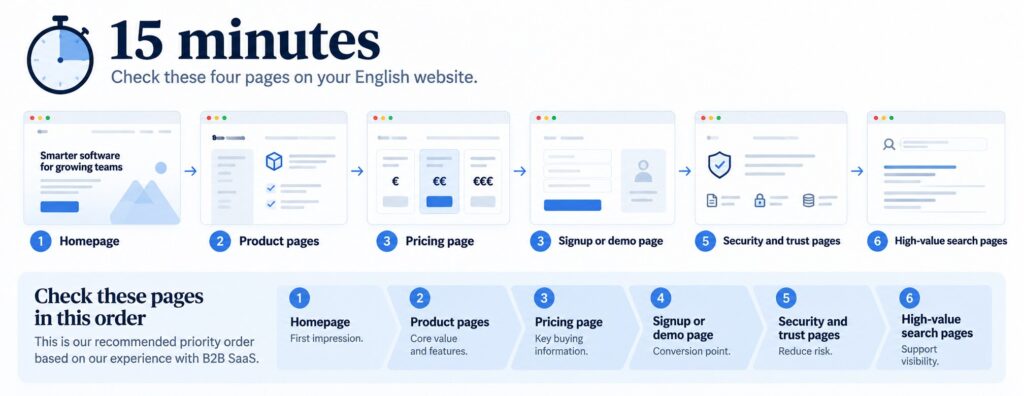
Set a timer for 15 minutes. You don’t need to read every page. Open your site in a private browser window, so saved language settings don’t change what you see, and look at four pages: the homepage, the pricing page, the signup or demo page and one trust page, such as security or privacy.
For each of the ten checks below, mark Pass or Review. Your score is the number of Review marks, from 0 to 10. If a native English speaker is available, ask them to read the same four pages and tell you where they slowed down.
The 10 Checks for Machine-Translated Websites
These ten checks cover the website localization mistakes that matter most to a B2B buyer, in four groups: wording, buyer-facing pages, search and technical setup, and brand.
Wording: does the English sound wrong?
Check 1: Source-language sentence structure
Do this: Read your homepage headline, first paragraph and main button aloud.
Red flag: Long sentences where the verb arrives late, abstract nouns doing the work of verbs, or noun stacks that would be one compound word in German. Common patterns are “the possibility to”, “the realization of”, “the utilization of” and “through our software, you have…”.
Illustrative example, not taken from a client website.
Carries the source-language structure | Written for an English-speaking reader |
“Through our software, companies have the possibility to optimize their internal processes.” | “Our software helps companies streamline their internal processes.” |
Why it matters: The first sentence is not wrong. It takes longer to say less, and it puts the software before the benefit. Headlines and buttons are the lines buyers actually read. Nielsen Norman Group’s usability research on plain language found that even expert readers prefer succinct, easy-to-scan writing, and the author argues it also helps international readers and people who use English as a second language.
Check 2: Literal terminology
Do this: Pick five terms that matter most to your product: your product category, two core features, your customer type and your main outcome. Search for how English-language competitors and industry sources describe the same things.
Red flag: A term that English-speaking sources consistently express differently. The clearest examples are in legal and compliance language. “Auftragsverarbeitung” is commonly described in English as commissioned data processing, or processing on behalf of a controller (Article 28 of the GDPR), and the agreement that governs it is called a data processing agreement (DPA). Rendering it as “order processing” is misleading. Likewise, “Datenschutzerklärung” is a privacy policy, not a “data protection declaration”. A term your competitors don’t use is not automatically wrong, but it is worth investigating.
Why it matters: Established terms make the page clearer to buyers and line your wording up with the terms people actually use and search for. A literal translation can leave a reader unsure what you are offering.
Check 3: Terminology and product names
Do this: Search your English pages for each product, feature and plan name and list every variant.
Red flag: The same feature under three names, such as workspace, work area and project room, or a module name that is translated on some pages and left in German on others.
Why it matters: Inconsistent naming can do more damage than a single awkward sentence, because it creates uncertainty about what you are selling.
Buyer-facing pages: where does it matter most?
Check 4: Pricing page
Do this: Read the pricing page as a stranger. Check plan names, billing terms, what is included and the number format.
Red flag: German-style “1.000,00 €” next to English text, unclear billing terms, or no way to tell what is excluded without writing to you.
Why it matters: This is where an international buyer decides whether you are easy to buy from.
Check 5: Signup or demo flow
Do this: Start your own signup or demo booking in English and write down every German string you meet.
Red flag: German button labels, form fields, error messages, confirmation emails or a calendar page that switches language halfway through.
Why it matters: A flow that drifts back into German tells the buyer the English version is not maintained.
Check 6: Security, privacy and data processing pages
Do this: Open one trust page and read it as a procurement reviewer would.
Red flag: Pages that exist only in German, use unusual terms instead of standard ones (GDPR, DPA, subprocessors, hosting location), or look like unreviewed machine output. Check your legal notice (Impressum) and privacy pages too.
Why it matters: For B2B buyers, these pages can become part of the approval process. We are not lawyers, so legal text needs a legal check as well as a language check.
Search and technical: is the setup right?
Check 7: Titles and meta descriptions
Do this: Search Google for site:yourdomain.com and read the titles and descriptions of your English pages in the results.
Red flag: Titles or descriptions that are still in German, half translated or cut off in odd places. Depending on the translation setup, these are easy to miss. Google also says it uses its own algorithms to determine a page’s language, so the visible text has to actually be English.
Why it matters: They are the first English sentences a searcher reads about you.
Check 8: URLs and language versions
Do this: Look at the address bar on your English pages and compare it with the German ones.
Red flag: The English version swaps in on the same URL, or the English page keeps leftover German URL elements such as /en/preise/. Google recommends using different URLs for each language version rather than using cookies or browser settings to change the language.
Why it matters: Clean, separate URLs make each language version easier for search engines to understand.
Check 9: hreflang
Do this: If you have separate German and English versions, ask whoever manages your website whether they reference each other correctly. If you are comfortable checking the page source, look for hreflang tags on the English homepage. Google says hreflang helps it understand that pages are localized variations of the same content. It can find alternate versions without it, but recommends indicating them explicitly.
Red flag: hreflang tags that are present but point to the wrong pages, are inconsistent between language versions, or don’t list the relevant alternatives, including the page itself.
Why it matters: Clear signals help Google match each version to the right audience instead of guessing
Brand: does it feel like one company?
Check 10: One-company voice
Do this: Read the homepage, the pricing page, one blog post and a trust page back to back, and note where the tone changes.
Red flag: The voice shifts from relaxed to stiff, or the blog sounds like a different author than the product pages. Formal German business register often arrives in English as language that is polite and heavy, while the competitors you are compared with write short and direct.
Why it matters: Uneven English suggests pages were translated at different times by different tools or people, and buyers notice.
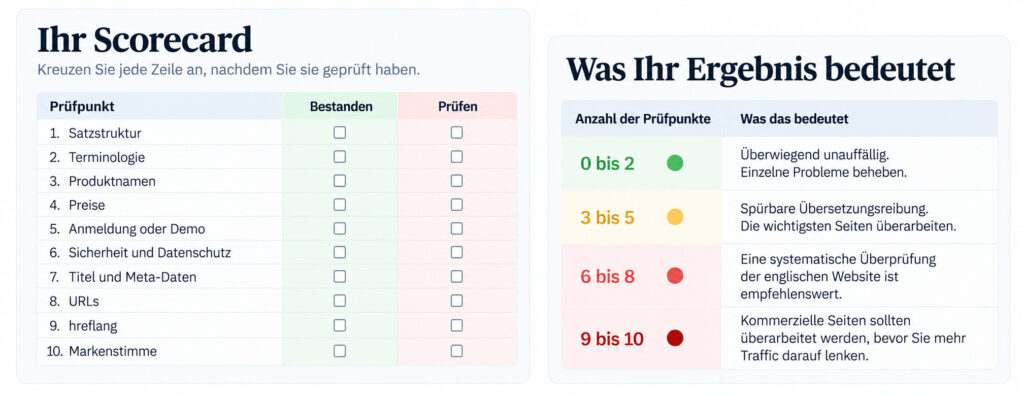
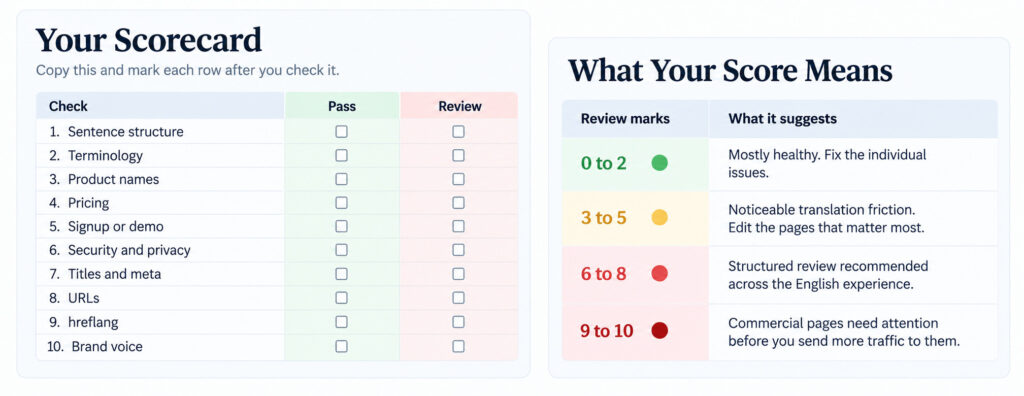
Your Scorecard
Copy this and mark each row after you check it.
Check | Pass | Review |
1. Sentence structure | ☐ | ☐ |
2. Terminology | ☐ | ☐ |
3. Product names | ☐ | ☐ |
4. Pricing | ☐ | ☐ |
5. Signup or demo | ☐ | ☐ |
6. Security and privacy | ☐ | ☐ |
7. Titles and meta | ☐ | ☐ |
8. URLs | ☐ | ☐ |
9. hreflang | ☐ | ☐ |
10. Brand voice | ☐ | ☐ |
What Your Score Means
Review marks | What it suggests |
0 to 2: Green | Mostly healthy. Fix the individual issues. |
3 to 5: Amber | Noticeable translation friction. Edit the pages that matter most. |
6 to 8: Red | Structured review recommended across the English experience. |
9 to 10: Critical | Commercial pages need attention before you send more traffic to them. |
Think of the score as a rough read on translated website quality, not a verdict. One awkward homepage headline can matter more than three small issues on secondary pages.
What Google Actually Cares About
Google does not publish a specific machine translation penalty. What matters is the quality and usefulness of the resulting content, alongside the technical handling of language versions. Three separate ideas sit inside that sentence.
Translation itself is not the problem. Asked about auto-translated content in 2019, Google’s John Mueller said he didn’t think it would trigger manual actions, “but if the translations are bad, then it’s bad content in general.” Google’s spam policies name translating only as one of the automated methods used to mass-produce pages without adding value. That targets scaled content abuse, not a company translating its own website.
Unhelpful content is the problem. Google’s guidance on people-first content describes content created primarily for people, not to manipulate search rankings. Clumsy, inconsistent or unclear English can undermine that goal, because the content is harder for the intended reader to understand and use, whether or not software wrote it.
Language versions still need clean setup. This is checks 7 to 9. It won’t improve your English, but it helps search engines match each page to its audience.
So the SEO problem is not machine translation. It is what happens when the output isn’t useful, clear or distinctive enough for the person searching. The same principle holds for generative search. Google’s guide to optimizing for generative AI features says “the best practices for SEO continue to be relevant” and recommends unique, non-commodity content, with no special markup or tricks. For how the two fit together, see our piece on SEO vs. GEO. Two related reads: what AI tools find about your SaaS company and how SaaS buyers research vendors in ChatGPT.
When Automatic Translation Is Fine, and When It Isn't
Automatic translation is a legitimate tool. The question is which pages can rely on it. This table is our judgment, not a rule from Google.
Approach | Best for | Main risk |
Automatic translation | Documentation, release notes, older low-traffic content | Literal language and inconsistent terminology |
Machine draft plus human editing | Existing sites with a limited budget | Needs a good editor and a repeatable process |
Written in English | Core commercial pages | Highest investment; most control over positioning and natural phrasing |
If you have a small team, don’t try to rewrite a hundred pages. (We wrote more about marketing a SaaS company with limited resources.) Start with the pages where a buyer decides, in this order:
➜ Homepage
➜ Product or service pages
➜ Pricing
➜ Signup or demo
➜ Security and trust pages
➜ Your highest-value search pages
Documentation and older posts can wait. A human edit of a machine draft can be a practical middle ground between publishing raw output and rewriting every page from scratch. Once the key pages are fixed, see how to measure SaaS content marketing so you can tell whether the changes are working.
The Goal Is Credible English, Not Perfect English
Your English website doesn’t need to sound American or British. It needs to sound like a company that understands the people it wants to sell to.
If your check turns up a few awkward sentences, fix them. If it turns up inconsistent terminology, untranslated pages and a broken English buying journey, you don’t have a typo problem. You have an English website problem, and it is worth fixing before you send more international traffic to it.
Credible also means distinctive. Correct English can still sound like everyone else, which is why we looked at why so much B2B SaaS content sounds the same.
Want an Outside View of Your English Pages?
If you would rather have someone look at your English the way an international buyer does, send us your English homepage and pricing page and tell us who you are trying to reach. We will tell you what we would fix first.
Market Plus Solutions helps small SaaS and IT teams get stronger English content marketing without building an in-house English marketing team. The language question also connects to a larger issue, buyer trust, which we covered in our SaaS buyers’ trust case study.
Frequently Asked Questions (machine-translated website)
How can I tell if my website was machine translated?
Look for several signals together: source-language sentence structure, literal terminology, inconsistent product names, leftover untranslated text and unnatural but grammatical phrasing. No single signal proves it, and you can’t identify the tool from the copy. What you can judge is whether the English reads as written for the buyer.
Is a machine-translated website bad for SEO?
Google does not publish a specific machine translation penalty. What matters is whether the resulting content is helpful, and poorly translated pages tend to fail that test. Language versions should also sit on their own URLs and be linked correctly so Google can connect them.
Can I use DeepL or an AI tool and still have a good English website?
Yes, as a first draft. The result depends on whether someone who writes business English reviews the pages that matter: the homepage, pricing, signup and trust pages. Most of the risk comes from publishing without that review, not from the tool.
Which pages should a human edit first?
Start with the homepage, product pages and pricing, then the signup or demo flow and the security and privacy pages. After that, fix titles and meta descriptions, and leave documentation and older posts for later.
What Was Your Score?
If you scored 4 or more, send us your English homepage and pricing page, tell us who you are trying to reach, and we will tell you what we would fix first.